
Overview
Labs for Module 2. The theory is in the Reflection Design Pattern notes.
Chart Generation: First Run
Ungraded lab: generate a chart, reflect on it and improve it (with my fix for a failing first attempt).
Chart Generation: Full Workflow
The same lab run end to end as one workflow.
SQL Query Generation
Ungraded lab: reflection with external feedback to improve generated SQL queries.
Graded Assignment
Reflection in a research agent: draft, reflect and revise an essay.
My notes and observations
Chart generation: observation 1
I had hit an error during the first chart generation where the LLM included one line in the code to merge the date and year, which was causing an issue. But the date column was already formated in the dataframe so this step was unncessary. While I tried to avoid that via prompt, it ended up generating another format of code, which is why I had added an additional line in the v1 chart generation part of the code to specifically comment out that part of the code.
I am assuming the seed value has been set to the API which is why the LLM generated the exact same code even after i tried to revert to the original prompt after my editing attempt.
The error I hit:
---------------------------------------------------------------------------
TypeError                                 Traceback (most recent call last)
Cell In[5], line 7
      5     utils.print_html(initial_code, title="Extracted Code to Execute")
      6     exec_globals = {"df": df}
----> 7     exec(initial_code, exec_globals)
      9 # If code run successfully, the file chart_v1.png should have been generated
     10 utils.print_html(
     11     content="chart_v1.png",
     12     title="Generated Chart (V1)",
     13     is_image=True
     14 )

File <string>:5

File /usr/local/lib/python3.11/site-packages/pandas/core/ops/common.py:76, in _unpack_zerodim_and_defer.<locals>.new_method(self, other)
     72             return NotImplemented
     74 other = item_from_zerodim(other)
---> 76 return method(self, other)

File /usr/local/lib/python3.11/site-packages/pandas/core/arraylike.py:186, in OpsMixin.__add__(self, other)
     98 @unpack_zerodim_and_defer("__add__")
     99 def __add__(self, other):
    100     """
    101     Get Addition of DataFrame and other, column-wise.
    102
   (...)
    184     moose     3.0     NaN
    185     """
--> 186     return self._arith_method(other, operator.add)

File /usr/local/lib/python3.11/site-packages/pandas/core/series.py:6154, in Series._arith_method(self, other, op)
   6152 def _arith_method(self, other, op):
   6153     self, other = self._align_for_op(other)
-> 6154     return base.IndexOpsMixin._arith_method(self, other, op)

File /usr/local/lib/python3.11/site-packages/pandas/core/base.py:1391, in IndexOpsMixin._arith_method(self, other, op)
   1388     rvalues = np.arange(rvalues.start, rvalues.stop, rvalues.step)
   1390 with np.errstate(all="ignore"):
-> 1391     result = ops.arithmetic_op(lvalues, rvalues, op)
   1393 return self._construct_result(result, name=res_name)

File /usr/local/lib/python3.11/site-packages/pandas/core/ops/array_ops.py:273, in arithmetic_op(left, right, op)
    260 # NB: We assume that extract_array and ensure_wrapped_if_datetimelike
    261 #  have already been called on left and right,
    262 #  and maybe_prepare_scalar_for_op has already been called on right
    263 # We need to special-case datetime64/timedelta64 dtypes (e.g. because numpy
    264 # casts integer dtypes to timedelta64 when operating with timedelta64 - GH#22390)
    266 if (
    267     should_extension_dispatch(left, right)
    268     or isinstance(right, (Timedelta, BaseOffset, Timestamp))
   (...)
    271     # Timedelta/Timestamp and other custom scalars are included in the check
    272     # because numexpr will fail on it, see GH#31457
--> 273     res_values = op(left, right)
    274 else:
    275     # TODO we should handle EAs consistently and move this check before the if/else
    276     # (https://github.com/pandas-dev/pandas/issues/41165)
    277     # error: Argument 2 to "_bool_arith_check" has incompatible type
    278     # "Union[ExtensionArray, ndarray[Any, Any]]"; expected "ndarray[Any, Any]"
    279     _bool_arith_check(op, left, right)  # type: ignore[arg-type]

TypeError: unsupported operand type(s) for +: 'DatetimeArray' and 'str'
The reason this came is because of the following code which the LLM had generated:
import pandas as pd
import matplotlib.pyplot as plt

# Filter data for Q1 of 2024 and 2025
df['date'] = pd.to_datetime(df['date'] + ' ' + df['year'].astype(str)) #THIS ONE
q1_2024 = df[(df['year'] == 2024) & (df['quarter'] == 1)]
q1_2025 = df[(df['year'] == 2025) & (df['quarter'] == 1)]

# Group by coffee_name and sum price for Q1 sales
sales_2024 = q1_2024.groupby('coffee_name')['price'].sum().reset_index()
sales_2025 = q1_2025.groupby('coffee_name')['price'].sum().reset_index()

# Merge sales data for plotting
merged_sales = pd.merge(sales_2024, sales_2025, on='coffee_name', suffixes=('_2024', '_2025'))

# Plotting
plt.figure(figsize=(10, 6))
plt.bar(merged_sales['coffee_name'], merged_sales['price_2024'], label='2024', alpha=0.7)
plt.bar(merged_sales['coffee_name'], merged_sales['price_2025'], label='2025', alpha=0.7, bottom=merged_sales['price_2024'])

plt.title('Q1 Coffee Sales Comparison: 2024 vs 2025')
plt.xlabel('Coffee Name')
plt.ylabel('Total Sales ($)')
plt.legend()
plt.xticks(rotation=45)
plt.tight_layout()

# Save the figure
plt.savefig('chart_v1.png', dpi=300)
plt.close()
So the first attempt to fix this via prompting, I added:
8. The DataFrame already includes separate columns for date and year. Do NOT try to combine them with '+' when parsing datetimes.
But this ended up handling the quarter and year column in a completely different way (I wish I had studied that issue, but I was just way too anxious to get it fixed that I went ahead with the next solution).
Since I kinda figured out that the LLM produced the same code after I had modified back the prompt, I directly went to comment out that problemetic line in the next cell where the code was written to extract it:
# Get the code within the <execute_python> tags
match = re.search(r"<execute_python>([\s\S]*?)</execute_python>", code_v1)
if match:
    initial_code = match.group(1).strip()

    # ---- PATCH START ----
    # Remove or fix the problematic line before executing
    initial_code = re.sub(
        r"df\['date'\]\s*=\s*pd\.to_datetime\(df\['date'\]\s*\+\s*'.*?'\s*\+\s*df\['year'\]\.astype\(str\)\)",
        "# patched out problematic datetime concatenation line",
        initial_code
    )
    # ---- PATCH END ----

    utils.print_html(initial_code, title="Extracted Code to Execute (Patched)")
    exec_globals = {"df": df}
    exec(initial_code, exec_globals)
And that solved the error and the output is visible in Chart Generation: First Run! Even the two diagrams have been downloaded and kept:
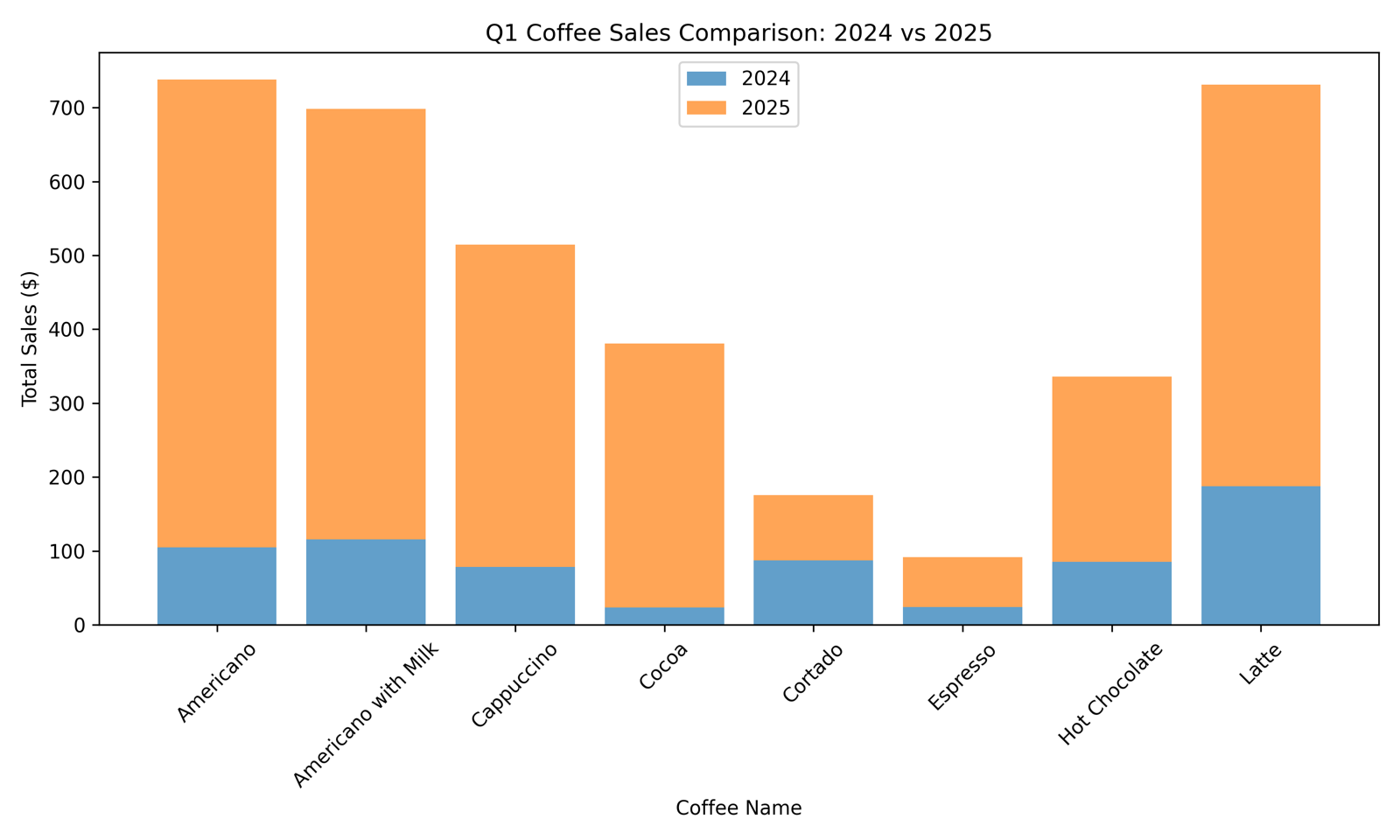
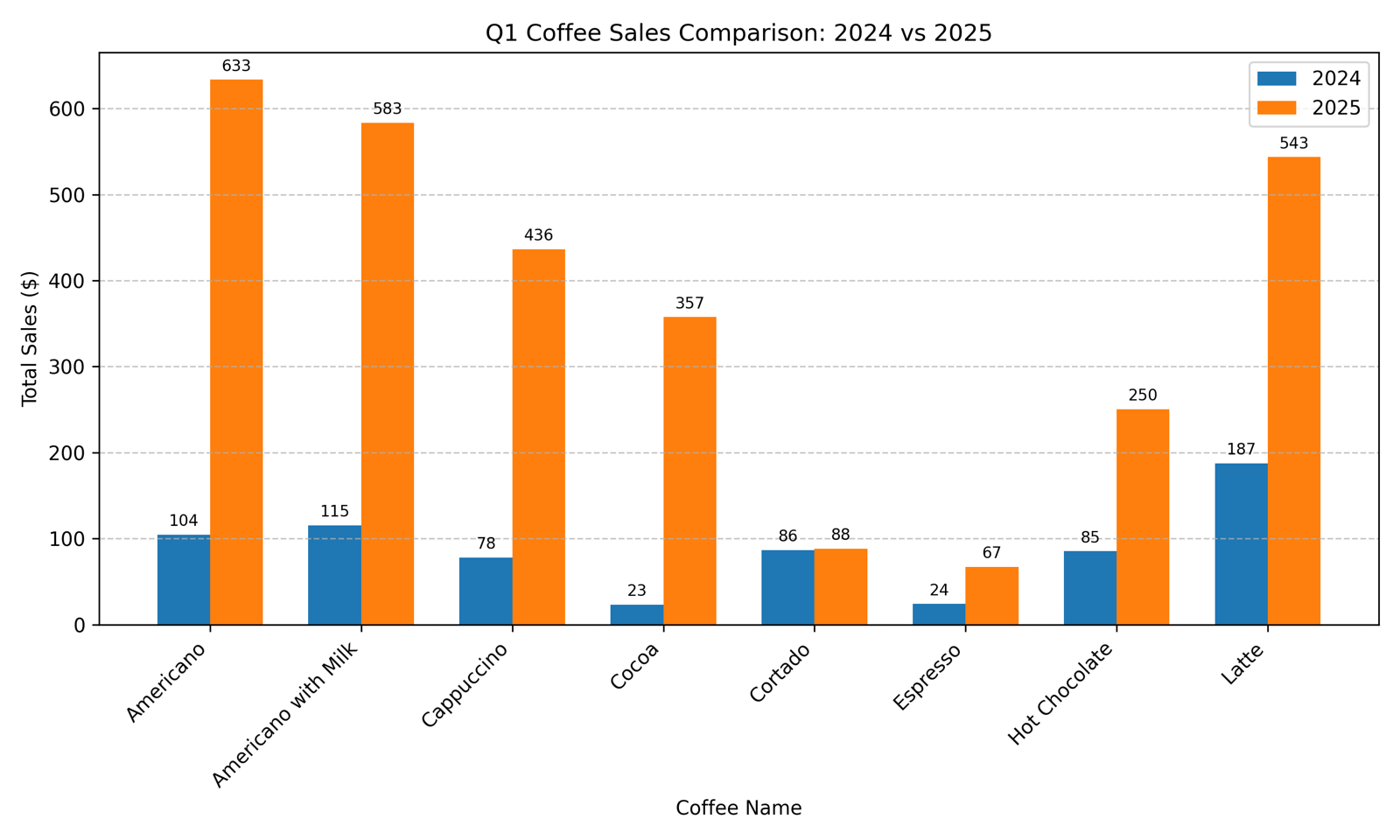
Now, the Interesting obersation here would be that, when the updated code and v1 chart was passed for the 'Reflection' step, it actually identified the unecessary line of code along with the need for improving the chart! This can be seen in its observation output and that really blew my mind.
Feedback on V1 Chart
The stacked bars make direct year-over-year comparisons difficult. A side-by-side grouped bar chart with clear colors, gridlines, and value labels improves readability. The date parsing is unnecessary and filtering can be done directly on the quarter and year columns.
That really did put a smile on my face :D
Chart generation: observation 2
This was during the execution of the last part of the notebook where it was the workflow as a whole. Now, the example was the same as what was shown in the course lecture, but for some reason the LLM actually ended up generating a good graph the first time itself and the second time, a slightly better one (this time like the one we saw in the lecture). I am not really sure why this behaviour occured but maybe I will comeback to this in the future.
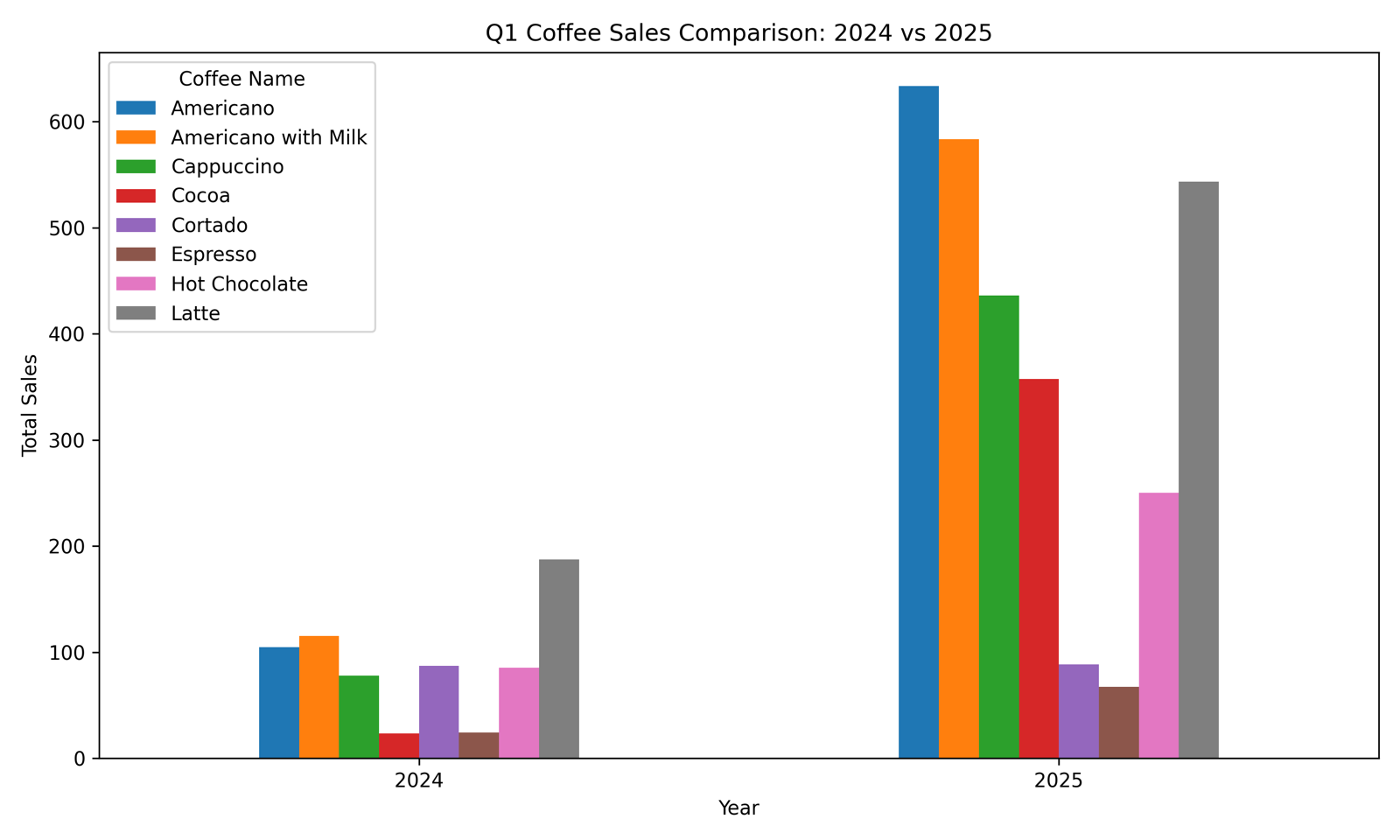
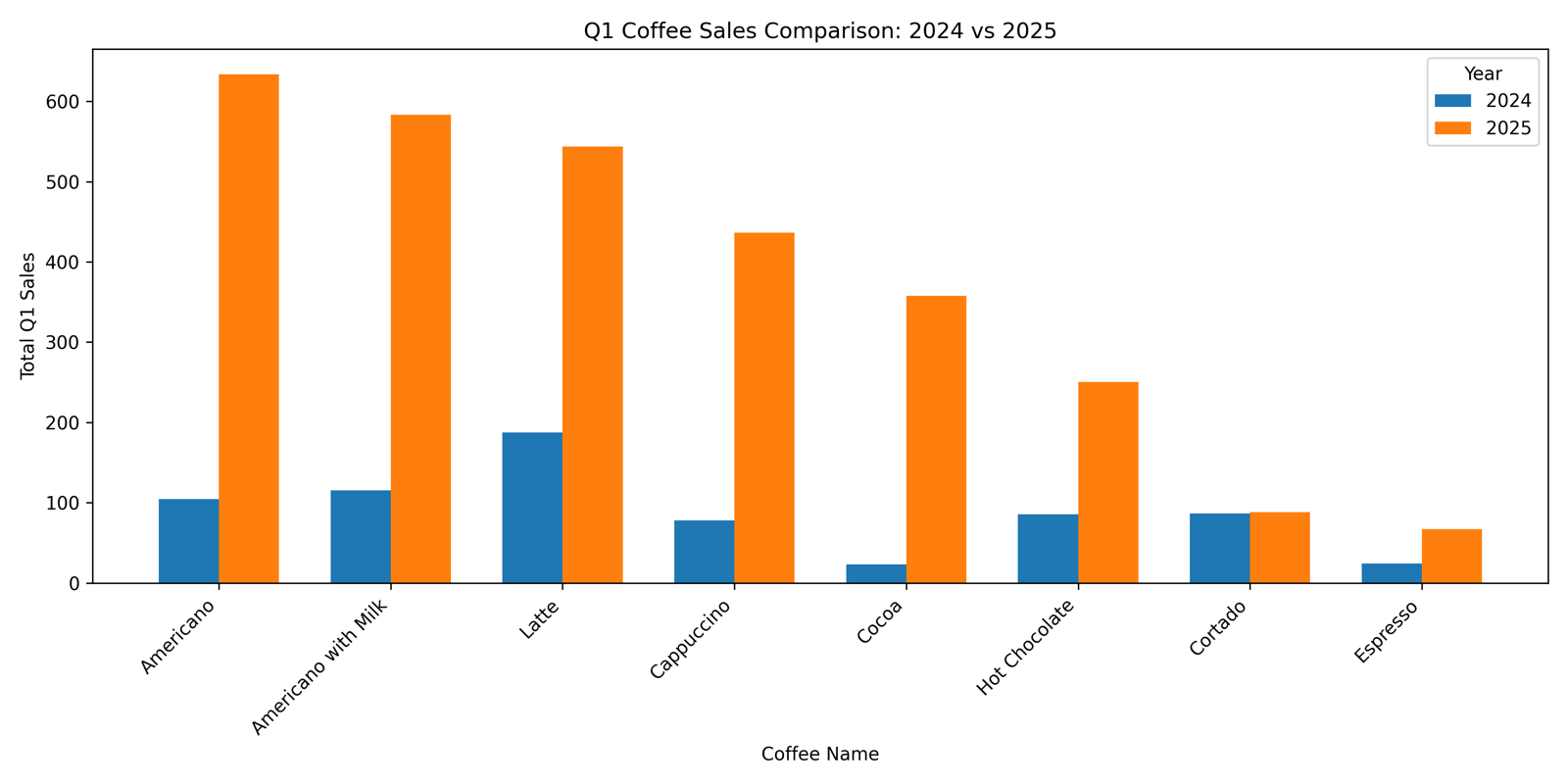
SQL query generation
No major observations for this, but one thing that did come to mind is that I could have provided external feedback to the notebook before this (chart generation) for the additional date column concatenation. That concept implementation was seen here, so that was prolly the main takeaway for me.
Copyright © 2024-2026 Muhammed Muzzammil Shah