from graphviz import Digraphdef trace(root): #Builds a set of all nodes and edges in a graph nodes, edges = set(), set() def build(v): if v not in nodes: nodes.add(v) for child in v._prev: edges.add((child, v)) build(child) build(root) return nodes, edgesdef draw_dot(root): dot = Digraph(format='svg', graph_attr={'rankdir': 'LR'}) #LR == Left to Right nodes, edges = trace(root) for n in nodes: uid = str(id(n)) #For any value in the graph, create a rectangular ('record') node for it dot.node(name = uid, label = "{ %s | data %.4f | grad %.4f }" % ( n.label, n.data, n.grad), shape='record') if n._op: #If this value is a result of some operation, then create an op node for it dot.node(name = uid + n._op, label=n._op) #and connect this node to it dot.edge(uid + n._op, uid) for n1, n2 in edges: #Connect n1 to the node of n2 dot.edge(str(id(n1)), str(id(n2)) + n2._op) return dot
draw_dot(L)
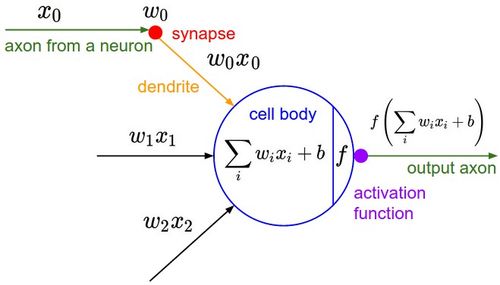
Implementing the Neuron Mathematical Mode
#Inputs x1, x2 of the neuronx1 = Value(2.0, label='x1')x2 = Value(0.0, label='x2')#Weights w1, w2 of the neuron - The synaptic valuesw1 = Value(-3.0, label='w1')w2 = Value(1.0, label='w2')#The bias of the neuronb = Value(6.7, label='b')
#n is basically the cell body, but without the activation functionn = x1w1x2w2 + b; n.label = 'n'
draw_dot(n)
Now, we have to get the output i.e. by having the dot product with the activation function.
So we have to implement the tanh function
Now, tanh is a hyperbolic expression. So it doesnt just contain +, -, it also has exponetials. So we have to create that function first in our Value object.
So now, lets update our Value object
import math
class Value: def __init__(self, data, _children=(), _op='', label=''): self.data = data self.grad = 0.0 self._prev = set(_children) self._op = _op self.label = label def __repr__(self): # This basically allows us to print nicer looking expressions for the final output return f"Value(data={self.data})" def __add__(self, other): out = Value(self.data + other.data, (self, other), '+') return out def __mul__(self, other): out = Value(self.data * other.data, (self, other), '*') return out def tanh(self): x = self.data t = (math.exp(2*x) - 1)/(math.exp(2*x) + 1) out = Value(t, (self, ), 'tanh') return out
#Inputs x1, x2 of the neuronx1 = Value(2.0, label='x1')x2 = Value(0.0, label='x2')#Weights w1, w2 of the neuron - The synaptic valuesw1 = Value(-3.0, label='w1')w2 = Value(1.0, label='w2')#The bias of the neuronb = Value(6.7, label='b')x1w1 = x1*w1; x1w1.label = 'x1*w1'x2w2 = x2*w2; x2w2.label = 'x2*w2'#The summationx1w1x2w2 = x1w1 + x2w2; x1w1x2w2.label = 'x1*w1 + x2*w2'
#n is basically the cell body, but without the activation functionn = x1w1x2w2 + b; n.label = 'n'#Now we pass n to the activation functiono = n.tanh(); o.label = 'o'
draw_dot(o)
We have received that output. So now, tanh is our little 'micrograd supported' node here, as an operation :)